Showing posts with label Aisa kya hindi. Show all posts
Showing posts with label Aisa kya hindi. Show all posts
Canon Image class MF3010 Printer is best low range three in one printer means (Scan, Print, Photocopy).In Canon printer, it is one of the best black and white printer at a low price. It can easily scan in PDF, JPG, JPEG, TIFF, BMP various file format. This printer max media size is A4.


Supporting size is A4 (8.25 in x 11.7 in), A5 (5.83 in x 8.25 in), B5
(6.93 in x 9.83 in), Executive (7.25 in x 10.5 in), Legal (8.5 in x 14
in), Letter a Size (8.5 in x 11 in), Statement (5.5 in x 8.5 in)
Printer Brand
· Brand Canon
· Product Line Canon Image class
· Model MF3010
· Power Consumption 450W
· Weight 8.2Kg
Printer Feature
· Type Digital
· Printing Technology Laser
· Available Function Print, Scan, Photocopy
· Standard Memory 64MB
Scanning
· Optical Resolution 600x600 dpi
· Color Depth 24 bit
· Interpolated 9600 dpi

Canon Imageclass MF3010 Printer Specifications,Feature and Review
How To Apply Online Passport Application in India Step by Step in Hindi/Urdu. In this videos we learn for how to apply for online passport application in Hindi tutorials, Here the solution how to apply for your own passport application 2017 step by step follow very carefully below steps:-
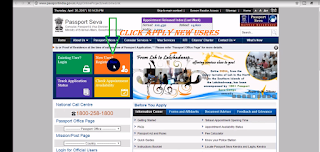
1) Login to Passport Seva online portal (Click Here to go Home page)

2) Click to apply for fresh or Re-issue passport as you see on left of yours.
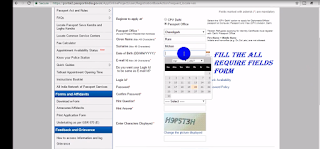
3) Fill the required field on an online Passport application in India .(as you see below on videos)
4) Click the "Pay and schedule" screen to schedule an appointment.
1) Login to Passport Seva online portal (Click Here to go Home page)

2) Click to apply for fresh or Re-issue passport as you see on left of yours.

3) Fill the required field on an online Passport application in India .(as you see below on videos)

4) Click the "Pay and schedule" screen to schedule an appointment.
How To Apply Online Passport Application in India Step by Step in Hindi/Urdu.
Subscribe to:
Posts
(
Atom
)


